


Answer:
The program will print out:
value now holds: 7
Same Variable Twice in an Assignment Statement
Look at the statements:
value = 5;
value = 12 + value;
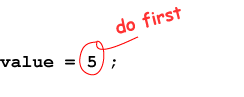
The first statement:
- Gets the number on the RIGHT of the equal sign: 5
- Puts the 5 in the variable called
value.
 |
 |
| Action of the First Statement | |
The second statement:
- Does the calculation on the RIGHT of the equal sign: 12 +
value.- It looks into the variable
valueto get the number 5. - Then it performs the sum: 12 + 5 resulting in 17
- It looks into the variable
- It now looks on the LEFT of the equal sign to see where to put the result.
Now puts the 17 in the variable called
value.
 |
 |
| Action of the Second Statement | |
Important Note: A variable can be used on both the LEFT and the RIGHT of the =
in the same assignment statement.
When it is used on the right, it provides a number used to calculate a result.
When it is used on the left, it says where in memory to save that result.
The two roles are in separate steps, so they don't interfere with each other. Step 1 performs the calculation using the value the variable starts with. Then step 2 puts the new value (from the calculation) into the variable.
QUESTION 16:
What does the following program fragment write?
value = 5;
System.out.println("value is: " + value );

value = value + 10;
System.out.println("value is: " + value );