


Answer:
slide = new JSlider( JSlider.HORIZONTAL, 0, 100, 79 );
Tick Spacing

The small vertical lines that calibrate a slider are called tick marks. The longer, thicker marks are major ticks and the thinner marks are minor ticks. The major ticks can be labeled. The spacing between major ticks is set with:
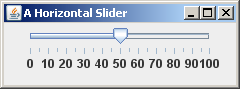
setMajorTickSpacing(int spacing)
and between minor ticks with:
setMinorTickSpacing(int spacing)
The spacing is in terms of the numeric values
of the slider.
 Bug Note: To have ticks and labels show up on
the display, you must call
Bug Note: To have ticks and labels show up on
the display, you must call
setMajorTickSpacing().
QUESTION 4:
Set the tick spacing of the above slider.