setPaintTicks and setPaintLabels

Classic programmed-learning exercises, refreshed for modern Java and presented in the current MrStyner.com portfolio style.

Modern Java noteThis archive has been refreshed for Java 25 LTS. Core language concepts remain useful, while outdated setup instructions and browser-era Java are labeled or replaced. Java 26 is the current feature release; Java 25 is used here as the stable teaching baseline.
go to previous page   go to home page   go to next page

Answer:

slide = new JSlider( JSlider.HORIZONTAL, 0, 100, 79 );
slide.setMajorTickSpacing( 10);
slide.setMinorTickSpacing(  5);

setPaintTicks and setPaintLabels
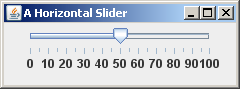
Horizontal Slider

The display of the tick marks and of their labels is turned on or off with the following methods:

setPaintTicks ( boolean state )
setPaintLabels( boolean state )

Sometimes you want the knob of a slider to stop only at the tick marks so that the value of the slider is an integer multiple of the minor tick spacing. Use this method:

setSnapToTicks( boolean state )

QUESTION 5:

Ask that ticks and labels be displayed as in the picture and that the knob snap to the ticks.

slide = new JSlider( JSlider.HORIZONTAL, 0, 100, 79 );
slide.setMajorTickSpacing( 10 );
slide.setMinorTickSpacing(  5 );
slide.setPaintTicks (  );
slide.setPaintLabels(  );
slide.setSnapToTicks(  );